Saturday, October 4, 2014

agrotourism tea garden Kaligua brebes

welcome to kaligua
Brebes is a district located at the westernmost tip of the province of Central Java, in addition to such famous culinary salted egg, Kupat glabed, blengong satay, fish bone crackers etc.. Brebes district also has a place - interesting sights such as the beautiful beaches Randusanga (R-Nine beach), Reservoir Malahayu, reservoirs Penjalin, Pangkuan temple, waterfall daughter (curug putri), Thermal Baths Cipanas, renjeng lake, and one I like the most is the garden tea Kaligua.


panorama green tea kaligua
Kaligua tea plantations at an altitude of 1200 - 2050 m above sea level. The air is very cold conditions, ranging from 8 ° - 22 ° C in the rainy season and reach 4 ° -12 ° C in the dry season. So do not be surprised if the tea plantation area is almost always shrouded in thick fog. The tea plantation is located on the western slopes of Mount Slamet (3432 m above sea level) which is the second highest mountain in Java island after Mount Semeru. From one of the places in the tea plantations Kaligua we can enjoy the beauty of mountain tops near Slamet, the peak Sakub.


path betwen green tea gardens
Kaligua agro tourism area provide many options for tours. Therefore, there are several interesting tourist sites are located in around Kaligua. for example the Japanese Cave, Bening Tuk, Cave of the Winds, Garden Tomb Founder Van De Jong. Some villas belonging to the estate can be used for those of you who want to spend the night. Kaligua tea plantation area, in addition to appealing for family tourism facilities, is also very suitable for refreshing for the city every day busy with routine work. To cater to tourists, growers provide homestay facilities (lodging) is pretty good. facilities; inn, guesthouse Flamboyan (6 rooms), Wisma Dahlia (3 rooms), Kenanga Pensions (2 rooms), the Orchid Pensions (2 rooms), Meeting House, Camping Area, outbound area, Gazebo, Soccer Field, Tennis Court, Volleyball Field , table Tennis & Billyard, Tea & Coffee corner (cafe), Orgel Music Entertainment Single, Tea & Catering Services, Health Centres, Worship Facilities.

arrrx.doc

road
or bike path between green tea gardens while enjoying the cool mountain air
indeed very exciting, you will even forget tired because anesthetized Kaligua panoramic beauty of tea gardens. atmosphere that is very beautiful and cool air can Kaligua unwind, make the mind becomes fresh, and the spirit was back to 100%. trust me this is very exciting brother & sister, try it yourself if you do not believe. this is very cool place for holiday.


GUA JEPANG


lorong gua Jepang (hall Japan cave's )
Kaligua to complete if you have not yet felt the sensation down the aisle cave Japan. The caves were built in the period of Japanese occupation is said to be a hideout Japanese army officials. Being at the bottom of the hill tea garden, this cave has a length of about 800 meters hall, for visitor safety menelusiri allowed only in the cave about 300 meters. every weekend, or when crowded in the hallway cave neon will be lit, but actually it would be sensational if we use spotlight (flashlight) or only when the torch through the cave.


signpost ruang pembantaian (slaughter room),  kamar kelelawar
(space bat)


in the cave there are several special rooms; There is a captive space, meeting rooms, space weapons, space massacre. R. bat. no need to fear no friendly guides who will accompany you through the cave is.
TRACING GOA

TUK BENING

after tired through the gardens and cave you can quench your thirst at the rest area near the outbound, or go directly to the water source "tuk clear" a natural spring water and fresh water can you drink straight.
wellspring "TUK BENING"
or if you want bath, can visit the small beautiful waterfalls teletak west just above the mouth of the cave
bathing in a waterfall


Indonesia backpacker shirt in drying


KALIGUA BLACK TEA

kaligua black tea

satisfied
after playing in the tea garden you may want to try delights and distinctive fragrance of black tea Kaligua you can get in the store - the store near the mill, you can also see the process of making black tea in tea factory Kaligua


Overcoming the error message when opening the network manager wicd [bakctrack 5]

Wicd Network Manager is one of the default network manager application that is used to select the backtrack connection, (eg use wifi to connect, lan cable, etc.). never happened when I opened the wicd network manager I get an error message as shown below:
wicd error messages
actually does not matter when we press ok wicd running as usual, but sometimes we feel uncomfortable if get an error message. the following countermeasures:

open a terminal and type the following command
# dpkg-reconfigure wicd
then enter the command again
# update-rc.d wicd defaults
reopen his wicd and god willing (insya Allah) the error message no longer exists.

Adjust the brightness of the screen using the command in the terminal backtrack

For Linux users, sometimes there are devices Brightness settings via the control panel or hotkey does not work. as I alamai on my backtrack linux. Then there are other alternatives to set it, here is how quickly Adjusting Brightness Through Terminal.
1. Open a terminal (CTRL + ALT + T)
2. Type the command
sudo setpci -s 00:02.0 F4.B=nilai , press enter.The value is the value of the strength of brightnes. The value provided is 1-99 or can be filled with BB.
Ex :   sudo setpci -s 00:02.0 F4.B=BB


*
if you use a value of 1 so dark, like death, it's better not to use a value of 1! !!


The command can be used to adjust the brightness of executable files through termnal. Sehngga will only execute it alone is the same run the above command. Here's how

  1. Open terminal
  2. type the command sudo nano brightness. (berghtness name just an example, could be another)
  3. input the command, sudo setpci -s 00:02.0 F4.B=BB  (must directly enter the value)
  4. press Ctrl + X, then Y, fatherly store.
  5. Change into an executable file, by way of sudo chmod 777 brightness. (Filename customized name above)
  6. Try running, with a double-click, if the question arises, just select RUN to run.
Thus Adjusting Brightness Through Terminal, may be useful..

body rafting along the river Cukang Taneuh / greencanyon pangandaran


My trip, My adventure arrrx.doc

     by relying on gps journey of brebes towards pangandaran takes about 6 hours by private car.  Pangandaran area located in the district of Kudat is not in doubt his fame as a tourist destination. Coupled with the popularity of Green Canyon or river cliff Cukang Taneuh with a very beautiful and clear green water. But it was not limited to that, ciamis Pangandaran area also has other tourist destinations that are not less beautiful. Karas including stone beach that has watersport facilities, the training ground for beginners and surf rock beach shark that has an interesting history.


greencanyon, cukang taneuh pangandaran_arrrx.doc

     Green Canyon with clear green color of the water is between the towering cliffs that showed exotic charm to the landscape incrible wonderfull, the hidden beauty of Green Canyon.
an exciting trip, we were invited down the river right - really beautiful with a fairly heavy flow of water in the drown, swept away, jumping off the cliff height of 8 meters, it is an unforgettable experience and stimulate adrenaline.

jump off a cliff. arrrx doc

okay hopefully my post will inspire you to define the target vacation spots!

Perfect waves in the paradise of surfers, Batukaras beach


batukaras beach surfer
Batu Karas beach is located not far from Pangandaran Beach and the natural attractions of GreenCanyon (Cukang Taneuh) Kudat. The distance from the Pangandaran coast approximately 40 km with a travel time of approximately 45 minutes by private vehicle.

This beach is famous for its large waves and is often used by surfers surfing arena both locally and overseas, arguably this beach paradise for surfers merupkn Not surprisingly, many recommended Batu Karas Beach surfing community as an arena for a comfortable surfing for surfers, especially for the beginners who want to learn to surf like me. 


hook legs with a surfboard


Caucasians carrying a surf board


In addition to surfing, the beach is also suitable for swimming and fishing. One of the recommended spots for the "fishing mania" is in the Rock Umbrella that is located on the western coast and can be accessed using the existing charter boat around the coast at a cost of about 20,000 per person. If you are not interested in fishing, you can try other activities such as water sports that can be done at this beach like playing banana boat that can boost your adrenaline.


bananaboat batukaras

Compared Pangandaran, Batu Karas Beach region is relatively more quiet, beautiful and natural. This place can also be a suitable alternative for newlyweds who want a honeymoon with an atmosphere of tranquility. although relatively quiet but the facilities at this beach is quite complete, some hotels and inns available here with price range varies, but all are relatively affordable, at the beach there is also a surf shop, which sells boards for surfing, as well as accessories for the surf just as fing, rope hook feet with boards, etc. so for those of you who want to buy a surf board or just view - could stop by to see this surf shop is located in the northern corner of the beach.

Since most of the many local residents who work as fishermen, seafood such as squid, crabs and various types of fresh fish is very easily found at affordable prices at the fish auction. Create your seafood lovers, culinary variety of fresh seafood can be the right choice to fill a hungry stomach after walking around this beach.

Choosing Batu Karas beach as tourist attractions can certainly make your vacation memorable. In addition to enjoying the atmosphere relatih quieter beaches, where you can also make the event with a culinary tour around the stalls located around the beach and selling a wide selection of seafood

to the surf spot


sunrise @batukaras beach

Creating Databases with phpMyAdmin


"phpMyAdmin
is a free software written in the PHP programming language that is used to handle the administration of MySQL over the network Jembar Jagat (World Wide Web). MySQL phpMyAdmin supports a variety of operations, including (managing databases, tables, fields (fields), relations (relations), the index, the user (users), licenses (permissions), and others)" source: wikipedia.com

Here will be described the simple steps to create a database with phpmyadmin, first you need to prepare the following software you need to create a database with phpmyadmin:
a. xampp or wamp
b. phpmyadmin
c. a web browser
After all the above software installed on your computer follow these steps:

1. activate the xampp control panel


2. Entry php my admin by typing "localhost/phpmyadmin" in browser address bar, then phpmyadmin will Appear on your webbrowser


4. Select sql menu, type the following command

5. click go
6.import


7. succes import


8. successfully created a data base

for how to fill in the data base I will discuss in my next article, thank you for reading my article may be useful!!

Friday, October 3, 2014

How to Erase the flash shortcut virus with a command prompt

virus shortcut

           okay on this occasion I will share a bit of knowledge for you guys who have problems with its flash because Shortcut virus. The virus is commonly be found on the flash. This virus is actually not too berbahaya.Tetapi if ignored will cause effects that can damage computer / pc you. Shortcuts can reproduce itself as a Trojan virus. This virus can menghidden files in the flash and create a new shortcut icons that can harm your PC if clicked.

Okay, now I will explain how to remove the shortcut virus from your flash.
1.  Plug your flash. Never opened its first in explorer.
2 . Click Start> All Programs> Accessories> Command Prompt.
3 . Type "attrib -h -r -s /s /d g:\*.*" or "
attrib -s  -r  -h  /s  /d" without the quotes.
command prompt
 description: 
        h: command to re-unhide all files on drive G.
        r: command to create files on drive G is no longer read-only.
        -s: command to release the files on drive G of the system to be easily removed.
        -g: my flash drive, Replace the drive you are infected with the virus fd
        *. *: All files that have the extension.
4 . Press enter, wait for it to finish.
5.  Before closing the Command Prompt, go to your flash.
6 . Remove files that are not permanently belong to your original file in flash
Now flash you safe from shortcutviruses. My advice, get used to scan the flash first before opening it.

How to Make a homegroup windows 8

HomeGroup is a feature of Windows 7 & 8 that can be used to improve your performance. HomeGroup in this case is the solution for small business environments that do not require a server because it only requires a computer to share files, folders, and printers. To effectively use the HomeGroup, PC is a maximum limit of 2-15 units, only. If more than that you should use a computer server with Windows Server as its OS.

Before starting, your computer must be connected to the network. The connection can be wired or wireless, but make sure you are connected to your home or office router first. The following will explain the steps - steps how to create a Homegroup in Windows 8:

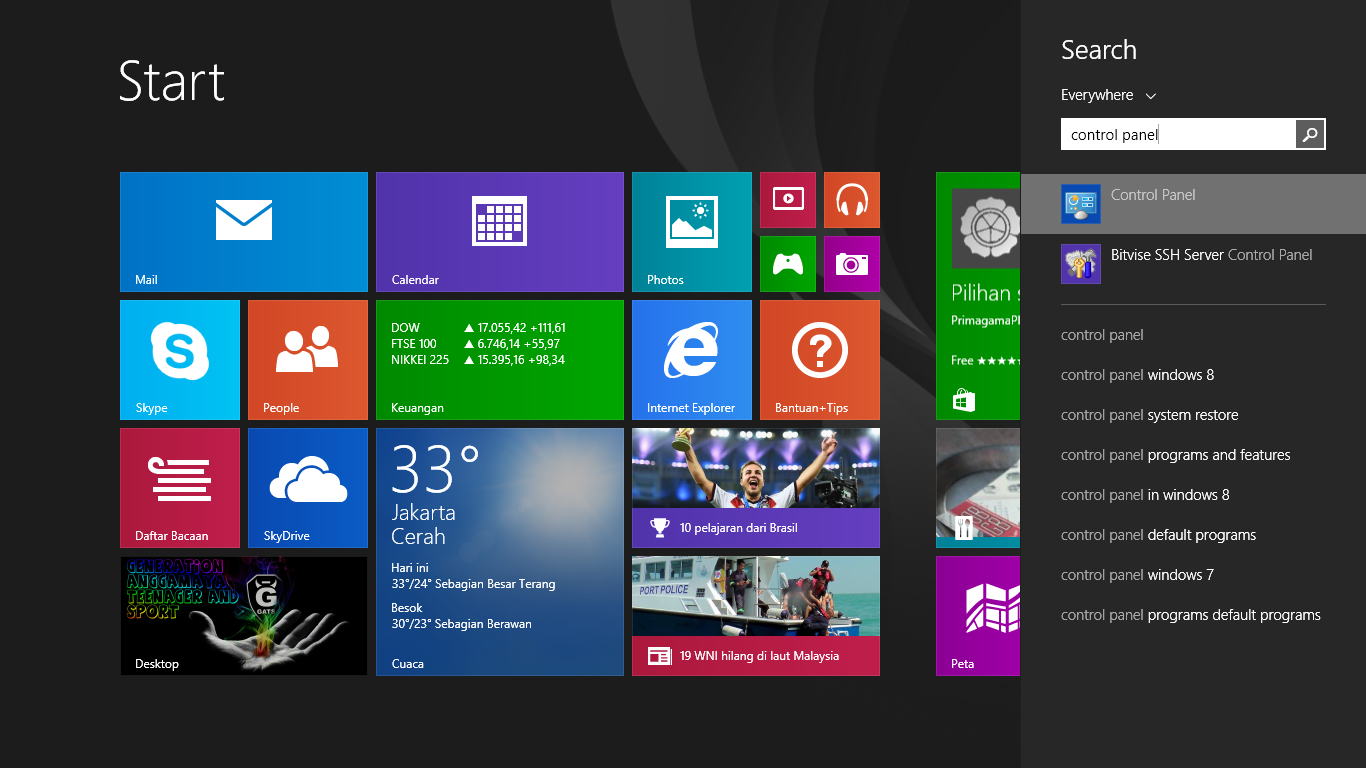
In Windows 8 the search box, type "Control Panel" to the Control Panel icon is displayed:
arrrx desk.png

Click on the icon of the Control Panel >> Network and Internet. Click on the HomeGroup option. Click the Create a HomeGroup.


HomeGroup wizard opens. Click Next. The wizard prompts you to select the file and any device that you want to share in the homegroup, and regulate resource usage license.


Click Next. Windows will assign the appropriate permissions to share resources with which you set. The wizard will display the auto-generated password that must be entered into each computer you wish to add to the homegroup. Do not worry if you do not like the password is created, you can always change it
 

click Finish.

Next you need to verify whether the homegroup has succeeded in making?
Very easy way: Go to Control Panel> Network and Internet> HomeGroup. Now you will see a list of devices in the library and for the homegroup.
  

and successfully created a group home safelyWindows 8 computers connecting to the homegroup to connect computers Windows 8 machine into a homegroup, make sure the machine is connected to the same network as the computer that is used to create a homegroup. either wirelessly to the same router or access point, or both connected to the same router, switch, or hub via an Ethernet cable.

on the computer that will be connected into a group home open Control Panel> Network and Internet> HomeGroup.Join a homegroup window opened Click join now > Next.


Select the folder that you want this computer to share with other members of the homegroup. Click Next. Enter the password that was created automatically (or you set) when first created homegroup. click next

Of the homegroup-joined Windows PC, you can go to the Library folder from the desktop and you will see a list for "HomeGroups." In this list, all the machines in a homegroup and all of them shared folders will appear. From here, you can quickly access files within the homegroup machines.From one machine, you can open and access files from another. Homegroups also useful if you do not have a storage facility such as a device (Network Attached Storage) NAS or media server, because you can share photos, videos and music between computers connected to the Homegroup, just by going to Explorer and click on another library computer. And new content is added to the library user, the user is automatically discovered by other computers in the homegroup.


Homegroups also provides control over the security of the data. By default, files are stored in the user's personal folder (the "My Pictures" folder, for example) allow other users Read access only. If you want to give others the Read and Write access you can place the file in the Public Pictures folder, for example, on your machine.


Finally, homegroups gives users a way to connect devices such as printers, to share between members. With homegroups and Windows 8 (remember, you can connect Window 7 machine as well) you can create a network, without the need to secure sophisticated enough to know absolutely nothing about computer networks.